Connect your documents
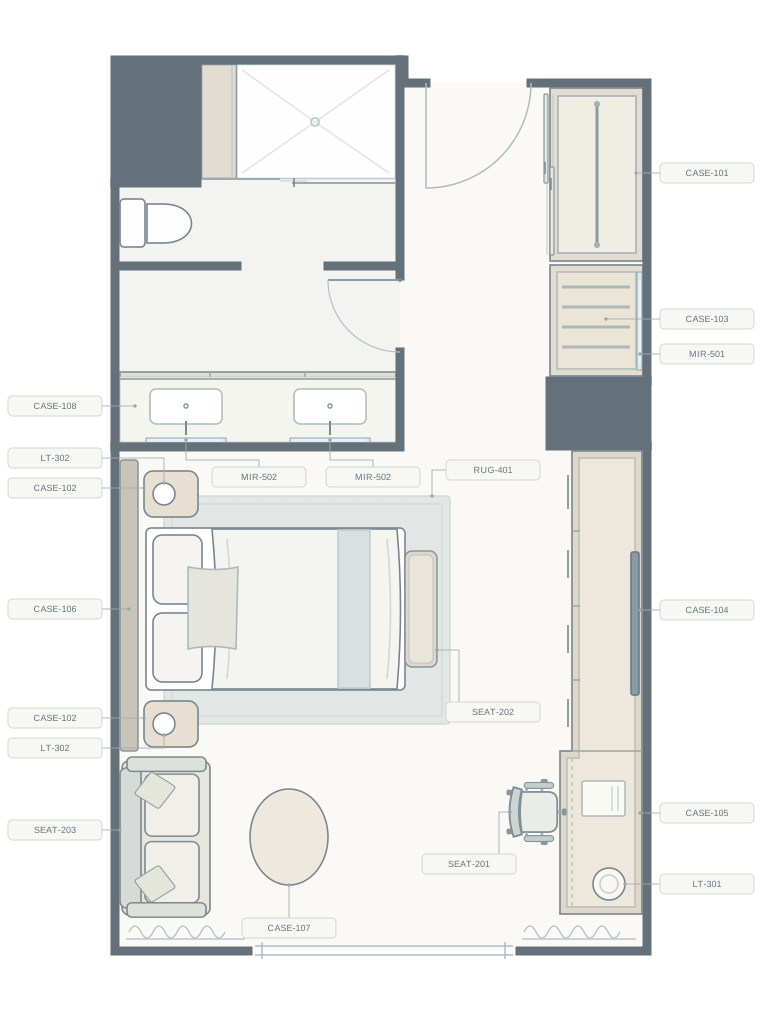
Upload your floor plan and link the FF&E matrix. Bring spec IDs, expected quantities, and drawing references into one review workspace.

Smart quantity review
Bring floor plans, matrices, and quantity review together.Your expertise stays at the center.
See the drawing reference and spec behind each quantity.
Spot differences between model findings and your matrix.
Review recommendations, adjust quantities, and approve the result.
Click a furniture item or spec tag to view its details.
Built to support your judgment, not replace it.
Upload your floor plan and link the FF&E matrix. Bring spec IDs, expected quantities, and drawing references into one review workspace.
Quantiv Forma 1.0 reviews the combined findings in context. Select a tag to inspect its source snapshot, recommended quantity, and differences that need attention.
Accept a recommendation or enter your own quantity. Your team resolves exceptions and approves the quantities used in the final output.
Compare OpenAI, Gemini, and Claude findings with the matrix basis. Quantiv Forma 1.0 adds an FF&E-focused review and recommendation for your team to confirm.
Explore the plan exampleMeet Quantiv Forma 1.0
The AI assistance you’re getting used to, shaped around the work you know: guestrooms, public spaces, furniture specifications, and the details that connect a design to its quantities.
We’re developing Forma as Quantiv’s own model for hospitality interior design and FF&E. Its role is to review the combined model findings through that industry context and give your team a clearer starting point for approval.
Beta · Forma 1.0FF&E spec IDs, room types, furniture schedules, and matrix quantities, connected to the spaces and items they describe.
Paired nightstands, alternate furniture selections, and differences between a typical room and a suite. The review needs to consider what belongs in each space.
Compare the model findings with the source documents, explain discrepancies, and surface questions for the reviewer. Your team approves the quantity.
Why three models, then Forma?
The purpose of multiple models is to make differences visible. Forma’s intended final pass adds a review grounded in your source documents and hospitality context before your team approves a quantity.
OpenAI, Gemini, and Claude each produce findings. Their differences help identify missed items, duplicate counts, and ambiguous symbols.
Agreement provides a signal; differences guide the next check.We’re designing Forma to examine the combined findings alongside the plan, specifications, and room context.
The source evidence should support the recommendation.Review the source and reasoning, resolve exceptions, and accept or adjust the recommended quantity.
Approval remains a deliberate team decision.Comparing different model responses can help surface disagreements for review. The research below informs this approach; Quantiv’s hospitality workflow requires its own evaluation.
Our planned evaluation compares findings with quantities checked by experts, including missed items, confidence scores, review time, and cost.
Accuracy note: Validation is pending. AI findings support your review; your team approves the final quantities.
What your team gains
When a count differs, the drawing reference, matrix basis, and model findings are already together. Spend your review time resolving the item.
One model may have included the adjacent mirror. The source snapshot gives the reviewer a place to check the spec boundary.
A plan for the way you work
Start on your own. Bring your team together. Make room for the work that needs you.
Your own review workspace.
One license. Your own workspace.
Choose Solo for core review on your own.
A shared process for your team.
$177/month minimum · 3 users
Choose Team for shared project review today, with three or more users.
For individuals and growing studios.
Individual rate · 1–2 users
Choose Studio for branded reports, flexible exports and saved setups, with no user minimum.
Built around your organization.
21+ users · annual agreement
Choose Enterprise to agree organization-wide requirements and service terms.
Compare the details
Find the tools that fit your business.
| Feature | Solo Starter | Team | Studio | Enterprise |
|---|---|---|---|---|
| Floor plans, matrices & spec-ID matching | Included | Included | Included | Included |
| Source evidence & editable review marks | Included | Included | Included | Included |
| AI model count comparisonsProcessing metered separately at provider cost. | Included | Included | Included | Included |
| Human approval & standard Excel export | Included | Included | Included | Included |
| Analysis history | Included | Included | Included | Included |
| Drawing-revision comparison & batch review | Not in plan | Not in plan | Coming soon | Coming soon |
| Reusable mappings & review templates | Not in plan | Not in plan | Coming soon | Coming soon |
| Configurable Excel reports & review filters | Not in plan | Not in plan | Included | Included |
| Branded PDF quantity reports | Not in plan | Not in plan | Included | Included |
| Personal saved export presets | Not in plan | Not in plan | Included | Included |
| Feature | Solo Starter | Team | Studio | Enterprise |
|---|---|---|---|---|
| Named user accounts | 1 user | 3+ users | 1+ users | 21+ users |
| Shared projects & basic member roles | Not in plan | Included | Included | Included |
| Recorded quantity approvals | Included | Included | Included | Included |
| Comments & assigned review tasks | Not in plan | Coming soon | Coming soon | Coming soon |
| Feature | Solo Starter | Team | Studio | Enterprise |
|---|---|---|---|---|
| Individual sign-in & password recovery | Included | Included | Included | Included |
| Two-step verification (2FA)Email verification with an optional authenticator app. Enable it in Profile & settings. Text verification is planned. | Included | Included | Included | Included |
| Project access permissions | Not in plan | Included | Included | Included |
| Single sign-on (SSO)Planned organization integration; provider and setup agreed separately. | Not in plan | Not in plan | Not in plan | Coming soon |
| Advanced organization access controls | Not in plan | Not in plan | Not in plan | Coming soon |
| Feature | Solo Starter | Team | Studio | Enterprise |
|---|---|---|---|---|
| Managed cloud document storageCurrent hosted storage; no unlimited storage allowance is promised. | Included | Included | Included | Included |
| Hosted project database | Included | Included | Included | Included |
| AI provider model selection & runtime controlsSystem-admin permissions required. Billing users can view configuration. | Included | Included | Included | Included |
| Connect your company cloud storageNot currently self-service. Connection and delivery scope must be agreed. | Not in plan | Not in plan | Not in plan | Coming soon |
| Company server/NAS or database connectionsNot currently available; deployment requirements need assessment. | Not in plan | Not in plan | Not in plan | Coming soon |
| Feature | Solo Starter | Team | Studio | Enterprise |
|---|---|---|---|---|
| Usage and cost reportingAvailable recorded usage; historical unmetered runs may have no cost. | Included | Included | Included | Included |
| Monthly/yearly PDF usage statements | Included | Included | Included | Included |
| Billing access & license assignmentRole-based permission, not a separate paid license. | Included | Included | Included | Included |
| System administration & activity recordsSystem-admin permissions required. | Included | Included | Included | Included |
| Workspace budgets, alerts & spending capsPlanned controls; not active enforcement today. | Coming soon | Coming soon | Coming soon | Coming soon |
| Custom onboarding & service terms | Not in plan | Not in plan | Not in plan | Coming soon |
Features marked Coming soon are planned for a future release.
AI processing, billed separately. Pay provider cost for the processing you use. Annual savings apply to seats only.
Choose a plan to discuss access with us. Studio’s team rate saves against its individual rate. Billing access is included with the appropriate permissions.
A review, broken down
One guestroom plan with a compact FF&E schedule. Three provider analyses plus a Quantiv Forma 1.0 final review.
| Review step | Model | Estimated cost (USD) |
|---|---|---|
| OpenAI analysis | GPT-6.1 Sol | $0.03250 |
| Gemini analysis | Gemini 3.8 Flash | $0.01125 |
| Claude analysis | Claude Sonnet 5.5 | $0.03000 |
| Quantiv Forma 1.0 final review | Quantiv Forma 1.0 | $0.05000 |
| Estimated total | $0.12375 | |
A guide to review costs, including an estimated Forma allowance. Your usage may vary; the subscription is billed separately.
The details
A few practical answers before you get started.
Your selected plan’s per-user subscription plus AI processing metered at provider cost. Annual seat subscriptions are paid upfront; AI usage remains separate and is excluded from the annual discount. Each named license belongs to one person, with an allowance of up to 2 devices.
Providers charge for the content their models read and produce, often measured in tokens. Document size, image detail, model rates, and the length of findings all affect usage. A review’s cost combines the calls made across its model passes.
Eligible completed findings can be reused without a new call for those steps. Provider input caching may reduce part of a fresh call’s cost, but new output can still be billed. Cache availability varies; the estimate above assumes no cache-hit discount.
Reading existing findings and approving a quantity do not themselves require another model call. Requesting a fresh AI analysis creates new processing usage, which is included in your monthly usage bill.
Security & compliance
Our launch standards bring together account protection, private AI processing, and control over team usage.
Two-step verification and individual accounts help keep access tied to the right person.
Our launch requirement excludes project inputs and results from training providers’ shared models.
Our launch standard covers encryption during transfer and storage, including project files and backups.
Planned admin controls bring review permissions, spending limits, and usage reporting together.
Launch readiness includes privacy and data-processing terms, a provider list, retention and deletion policies, incident response, and access reviews. Approval records should identify who made a quantity decision and when.
Spend less time counting and comparing.
More time designing and making decisions.